

Measurable PII removal status data is now available at your fingertips.
Optery for Business administrators can now generate a CSV export of PII removal status data for one, several, or all organization members. The export includes the complete history of status changes for each member at each data broker.
The CSV includes data broker names, opt-out statuses, timestamps, profile links, screenshot URLs, and view URLs. Administrators can filter the export by status and member group, and a secure download link is delivered by email.
This new export supports quarterly and annual reporting on data broker removal progress.
Why the Export Preserves Status History
The Optery for Business Admin Dashboard remains the right place for at-a-glance, organization-level metrics. The export provides the underlying data administrators need to:
- Calculate metrics across any time period, such as removals submitted during the previous quarter, average time to removal by broker, or status distribution by group.
- Feed status changes into a SIEM, GRC platform, or internal reporting system.
- Document removal activity for board reports, cyber insurance renewals, or audit requests.
How to Generate a PII Removal Status Report in Optery
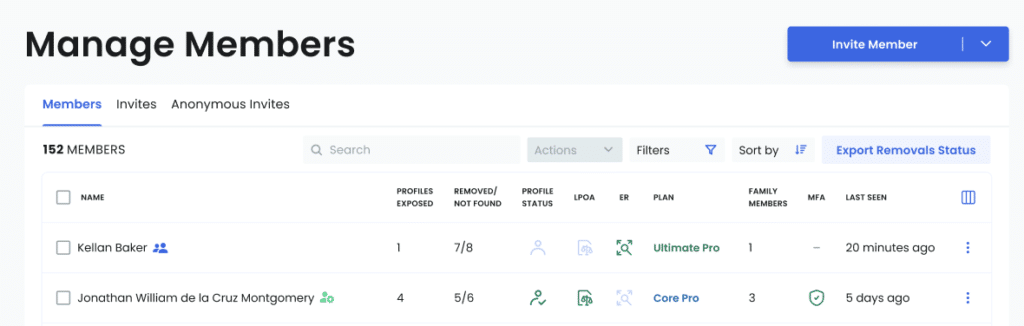
The Optery for Business interface makes it easy to locate and configure the status export. Under Manage Members, administrators can select specific organization members, removal statuses, and member groups to include in the report.
After selecting the desired filters, a confirmation message will indicate that the export is being processed. Once the file is ready, you will receive an email containing a secure download link.
A Note on the Deliverables
he export is processed asynchronously and delivered by email. The secure download link expires 48 hours after the export is generated. Screenshot URLs included in the export expire 90 days after the export is generated.
The export does not aggregate the data. Each row represents a single status event, allowing administrators to track status changes over time and calculate metrics across reporting periods.
Ready to Generate a PII Removal Status Report?
Log in to your Optery for Business accountand navigate to Manage Members. A more detailed walkthrough is available in the Optery Help Desk article.